Handling Distractions While Working Remotely
Remote work distractions that drain revenue across distributed teams
Distractions can reduce productivity before they begin to impact team morale. They often result in missed opportunities, added work, and delayed decisions. Key decision-makers or top executives feel these effects through increased customer turnover, project delays, and rising costs.
Teams working in different locations face a cluster of interruption sources:
Chat notifications that prompt expectations for immediate replies.
Constantly moving between various project, knowledge, and CRM systems.
Unclear responsibilities, leading to frequent status checks.
Too many meetings with no clearly defined objectives.
Spontaneous support requests that don’t follow standard processes.
To combat these distractions more effectively, it’s important to focus on establishing comprehensive company-wide policies and developing well-structured communication systems, rather than relying solely on individual willpower.
Setting rules for notifications and communication
Define response-time tiers everyone understands
Tier 0: Incidents only – Use a dedicated channel and an on-call rotation.
Tier 1: Cross-team blockers – Respond within four business hours.
Tier 2: Routine collaboration – Response expected within one business day.
Make asynchronous communication the default
Share decisions and updates in platforms where teams collaborate. Limit real-time chats for urgent blockers.
Turn off nonessential alerts
Silence unnecessary app notifications, keeping alerts only for changes in ownership, blockers, or major incidents.
Leaders shape the culture. Demonstrate best practices by reducing broad notifications, using informative email subjects, and clearly assigning responsibilities.
Reducing multitasking in digital workspace
Fragmented tool environments force employees to constantly switch gears. Minimize the need for switching between different tools by consolidating the most critical platforms for projects, knowledge, and CRM access.
Consider the following design strategies:
Establish one location to view tasks, project status, and blockers for both teams and individuals.
Connect CRM records to project delivery tasks for complete alignment.
Use standardized labels across tools for better filtering and collaboration.
Implement a unified identity and permissions model, removing hidden or redundant spaces.
Archive old projects and spaces to keep searches efficient and focused.
Some organizations centralize work using platforms like Routine, Notion, or ClickUp, while others integrate specialized tools to create unified views. For a detailed look at the advantages between all-in-one workspaces and specialized project tools, refer to this comparison guide.
Maintaining effective meeting practices
Meetings should be used to make decisions, not just to fill a block of time. Limit attendees and clarify the meeting’s decision point upfront.
Distribute background information at least 24 hours before the meeting.
Begin with the decision to make, relevant constraints, and available options.
Set time limits for each topic and set aside unrelated discussions.
Conclude with a designated owner, a deadline, and clear next steps.
“No decision, no meeting.” Treat this as a policy to maintain efficiency.
For more actionable frameworks, explore our guide to running effective meetings with documented formats.
Streamlining CRM and sales notifications
Sales teams often experience notification overload. Route alerts and updates strategically for maximum impact.
Trigger product-usage alerts only when client behavior justifies outreach.
Group low-priority notifications into digests delivered twice daily.
Notify only the relevant account owner and their team of stage changes.
Automate data entry from communications to reduce manual tasks.
Allocate specific blocks for outreach and mute unnecessary channels during those times.
Review and fine-tune your notifications monthly, focusing only on alerts that drive clear actions.
Implementing knowledge management to reduce distractions
Each question left unanswered becomes an interruption. Build scalable resources that address questions at their source.
Assign ownership and a review date for every process document.
Structure resources by listing the purpose, inputs, steps, and outcomes upfront.
Use tags for team, product, and project stage to enhance navigation.
Archive or hide out-of-date pages to improve search results.
Record major decisions with dates and responsible individuals to reduce repeated queries.
Teams often work faster when they transition from individual systems to shared structures. That’s why “personal apps for work” often stall as teams grow.
Setting metrics for optimizing remote operations
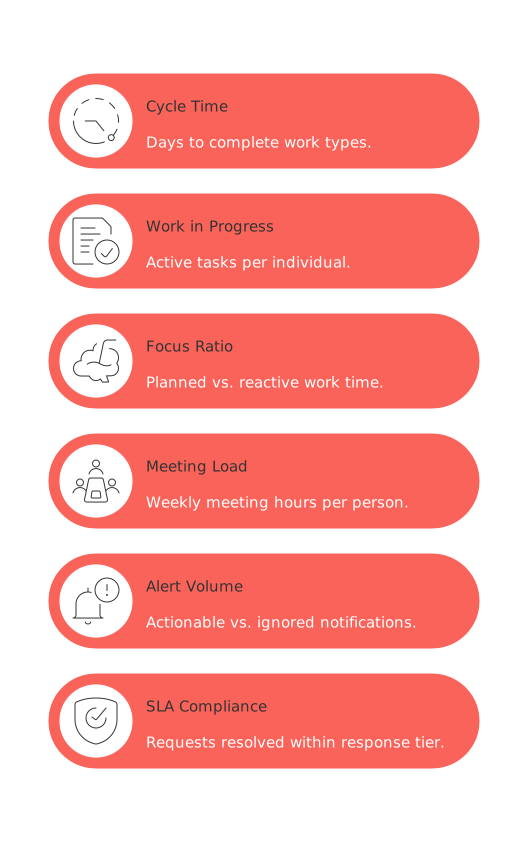
Select a few leading indicators and review them regularly to maintain improvement and accountability.
Cycle time: Number of days required to complete distinct work types.
Work in progress: Count of active tasks assigned per individual; aim for fewer tasks and more completions.
Focus ratio: Comparison of planned work time vs. reactive work time.
Meeting load: Weekly hours spent in meetings per person, assessed for their value.
Alert volume: Ratio of actionable to ignored notifications.
SLA compliance rate: Percentage of requests resolved within the designated response tier.
Pair quantitative tracking with qualitative insights, such as recurring frustration points, examples of forced context switching, and findings from incident reviews.
When to centralize your workspace, and when to keep tools separate
An integrated workspace makes sense when the time wasted switching between tools outweighs the advantages of using specialized platforms. On the other hand, dedicated tools are preferable when unique capabilities are essential to your workflow.
Clear reasons to consolidate
Employees spend more time gathering information than completing work.
Leaders request updates spanning three or more different systems.
Duplicate information leads to inconsistencies and confusion.
When specialized tools make sense
Compliance or regulatory needs require unique features.
Existing integrations already create a unified view of necessary tasks.
The costs associated with licensing or migration outweigh the immediate benefits.
Most organizations benefit from a balanced approach: retain powerful, specialized tools for CRM or other key functions, but surface essential project or client details in a central platform like Routine, Notion, ClickUp, or Monday.com. For a deeper understanding of these trade-offs, revisit our earlier in-depth comparison of workspace options and use your organization’s data to guide your decisions.
FAQ
What are some common distractions in remote work environments?
Chat notifications, unclear responsibilities, and excessive meetings disrupt focus and lead to inefficiency. This fragmentation, often caused by switching between multiple tools, challenges productivity and can drain revenue.
How can asynchronous communication benefit teams?
Making asynchronous communication the default reduces unnecessary disruptions and supports better decision-making. It allows team members to prioritize tasks effectively without the pressure of immediate responses.
Why should nonessential alerts be turned off?
Nonessential alerts clutter the work environment and lead to frequent context switching, reducing overall efficiency. Focus on alerts that are critical to workflow, like major incidents or changes in ownership.
When should a company consider centralizing its workspace?
Centralization is beneficial when employees spend excessive time switching between tools, leading to productivity loss. Routine can help consolidate necessary functions, minimizing duplication and confusion.
What are the signs that too many meetings are being held?
Meetings without clear objectives or outcomes drain time and resources. They should be decision-driven, involve necessary personnel, and end with actionable steps to ensure they contribute value.
How to optimize CRM and sales notifications effectively?
Streamlining notifications to focus on actionable alerts helps avoid overload, keeping sales teams proactive. Routine enables better notification management by routing relevant updates strategically.
What is the role of knowledge management in reducing distractions?
Centralized and well-maintained resources prevent interruptions by providing immediate answers. This foundational structure limits repetitive questions and empowers self-sufficient teams.

Julien Quintard
Founder & CEO at Routine02/02/2026
